
Showing posts with label How to Permanently remove shortcut virus. Show all posts
Showing posts with label How to Permanently remove shortcut virus. Show all posts
Wednesday, 4 December 2013
How to Remove Shortcut Virus from the Computer

This is very tricky situation in Computer Users Society. We always found shortcuts created in our USB Flash drive. It is the rule of the nature that where bad guys tend to exploit/destroy the peace there good guys also serve the people with their knowledge. The same situation is here, when i saw shortcuts in my USB flash drive, I got furious and applied every method to remove the virus which I knew. But after a few days, I came to know that there is another method, although not as much easy as the other methods but its very helpful and permanently deletes the virus from the computer also.
Don't worry, the method I am going to introduce to you is not so difficult that you might think but be conscious using this method. If you follow the steps accurately, there will be no harm to your system.
- First of all, press"shift+alt+delete" button from your keyboard, "Windows task manager" will open
- Select "processes" and search for "wscript" named file by scrolling down the page and by right click on it select "end task"
- Then close and click "start" button
- Click Run and enter "regedit" in the box
- Click "HEKY_CURRENT_USER"
- Then click "Software"
- Then click "Microsoft"
- Then click "Windows"
- Then click "Current version"
- Then click "Run"
- This window should be shown as in the picture below:
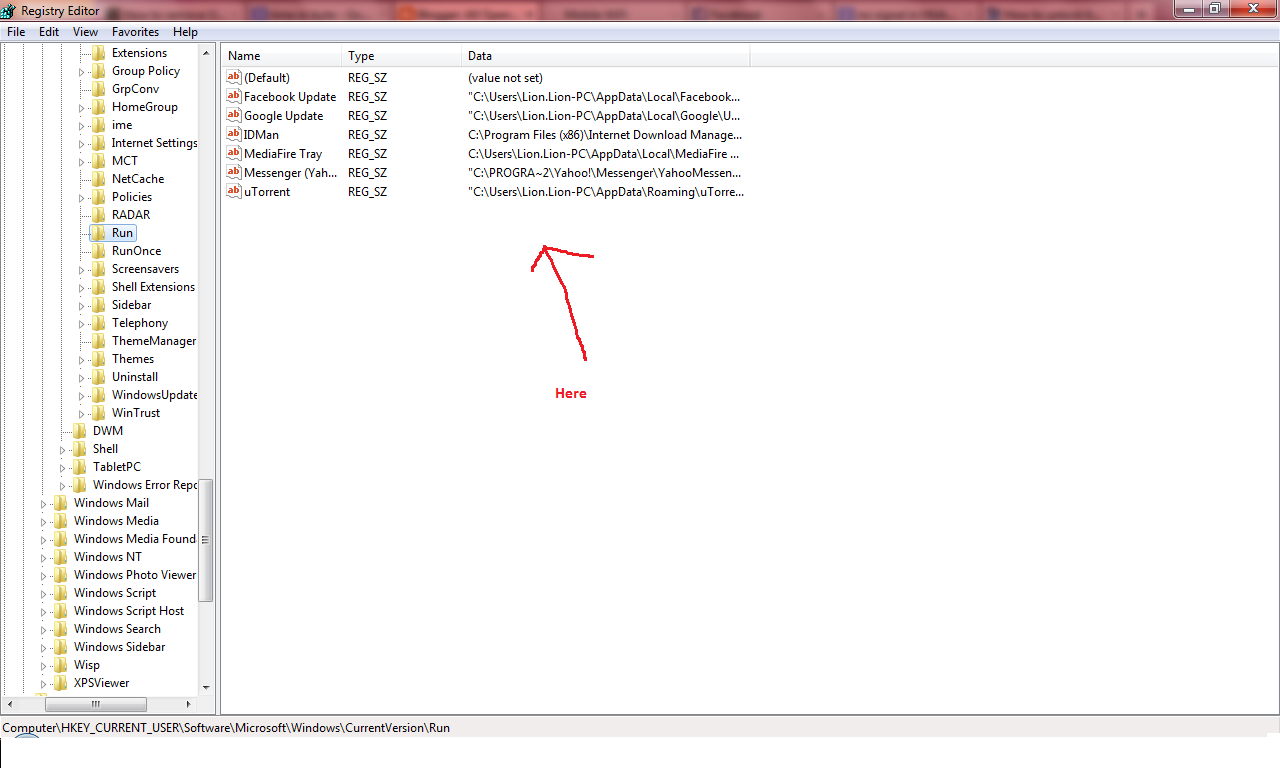
- If you find "odwcamszas." , right click on it and select "delete" and the virus will be removed.
If you found this helpful comment below. Thanks
Click to Read more...

Subscribe to:
Posts
(
Atom
)